
# WebView
Zamna WebView is a hosted React SPA that implements the full Ready To Fly passenger UI on top of the Ready To Fly API. It handles consent, travel document verification, questions, checklist item resolution, and completion — so airlines do not need to build this UI themselves.
# 1. Overview
Two integration modes are supported:
| Mode | Use case |
|---|---|
| Browser | Airline web check-in links the passenger to WebView in the browser |
| Embedded | Airline native iOS/Android app hosts WebView in-process |
The airline deploys the full Zamna stack. The WebView is served from a separate frontend host; the backend API runs on its own host. All API calls are made inside the WebView using the JWT issued by /start2 — the client app does not call any RTF API endpoints directly.
For the passenger flow inside WebView (wizard steps, API calls per step), see Ready To Fly — Flow.
# 2. Browser integration
# Booking ID encryption
The airline backend encrypts booking data using a shared AES/RSA key, then encodes the result as:
url_encode(base64_encode(encrypted_booking_data))
The final value is passed as the encrypted_booking_id query parameter. URL-encoding is required because base64 output contains +, /, and = characters that are not safe in query strings.
The encrypted value is passed to the web or mobile app, which uses it to call /start or /start2 — no raw booking data is exposed to the client.
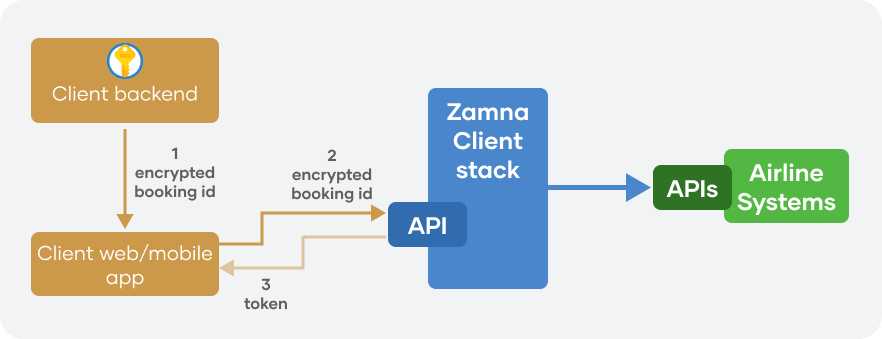
See also Ready To Fly — Authentication model.
# /start2 — browser redirect initiation
Entry point for both browser and embedded flows. The backend creates or resumes a MultiPax session and responds with 302 redirect to the WebView.
All URL-valued parameters (redirect_url, return_url) must be URL-encoded when constructing the /start2 query string, since they contain ://, /, ?, and & characters.
| Param | Required | Description |
|---|---|---|
encrypted_booking_id | Yes | url_encode(base64_encode(encrypted_booking_data)) |
redirect_url | Yes | URL-encoded base URL of the WebView frontend (trailing slash recommended). Backend appends session path and JWT |
return_url | No (recommended for browser) | URL-encoded URL where the passenger is sent after completion. Appended with ?ready_to_fly=true on success; shown on error/ineligible screens |
pax_ids | No | Comma-separated DCS passenger keys. Omit for all passengers; provide one key for single-pax embedded flows |
consented | No | true/false — pre-set consent at session creation, skips consent step in WebView |
locale | No | BCP 47 language tag (eg en-US, es-MX). Falls back to client-configured default. Alias: language |
mode | No | Pass embedded for native app integration (see §3). Omit for browser |
departure_station | No | IATA code to select journey leg when multiple future journeys exist. Alias: departureCity |
encryption_mode | No | Encryption mode for booking id decryption (eg AES_CBC) |
On success:
302 → {redirect_url}/session/{sessionId}/?pax_check_token={jwt}&locale=...&return_url=...&chosen_pax_sessions=...
On error:
302 → {redirect_url}/not-found/
302 → {redirect_url}/ineligible/
(with return_url appended if provided)
redirect_url vs return_url:
redirect_url— base URL of the WebView SPA. The backend builds the session URL by appending the session path and token to this base. Required on every/start2call.return_url— where the passenger goes after completing (or exiting) the RTF flow. The WebView navigates the browser toreturn_url?ready_to_fly=trueon success, or shows a button back toreturn_urlon ineligible/not-found screens. In embedded mode this URL is unused — completion is signalled via the native bridgecloseFlowevent.
Links: swagger (opens new window), redoc (opens new window)
# /start — programmatic session creation
JSON API alternative — returns session data directly, no redirect. Used when the airline backend creates the session server-side and passes the token to a frontend or mobile app (alternative auth model — see Ready To Fly — Authentication model).
| Param | Required | Description |
|---|---|---|
encrypted_booking_id | Yes | url_encode(base64_encode(encrypted_booking_data)) |
consented | No | true/false |
pax_ids | No | Comma-separated DCS passenger keys |
encryption_mode | No | Encryption mode (eg AES_CBC) |
Response:
{
  "data": {
    "session_id": "...",
    "pax_check_token": "...",
    "session": { ... }
  }
}
Links: swagger (opens new window), redoc (opens new window)
# 3. Embedded WebView integration (iOS / Android)
# Overview
The native app embeds Zamna WebView as an in-app WebView component (iOS WKWebView / Android WebView).
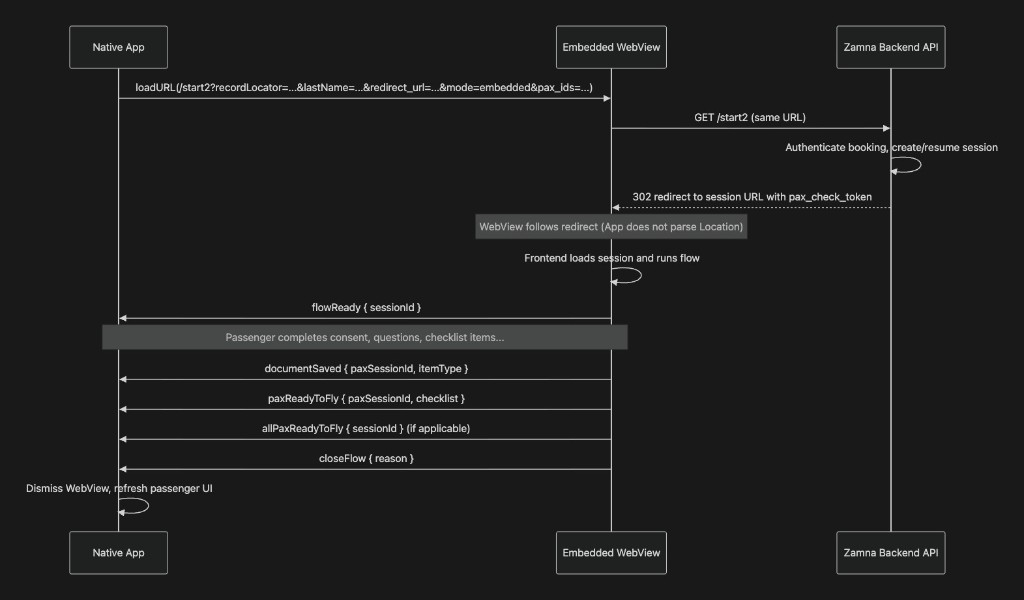
The app loads a single URL — the /start2 endpoint with mode=embedded — and does nothing else to initialise the session. The backend 302 redirect is followed automatically inside the WebView component. The app does not need to:
- Intercept the
Locationheader - Parse
pax_check_token,sessionId, orchosen_pax_sessionsfrom the redirect - Build or load the session URL itself
The WebView communicates progress and completion back to the native shell via a JSON message bridge.
# Loading the WebView
Construct the /start2 URL with mode=embedded, pax_ids (single passenger DCS key for per-passenger flows), URL-encoded redirect_url (WebView frontend host), and optionally consented=true and locale:
https://{zamna-backend-host}/start2
  ?encrypted_booking_id={url_encoded_base64_encrypted_data}
  &redirect_url={url_encoded_webview_host}
  &mode=embedded
  &pax_ids={dcsPassengerKey}
  &locale=en-US
  &consented=true
Requirements:
| Requirement | Detail |
|---|---|
| Camera | Grant getUserMedia video to the WebView origin (no microphone) |
| JavaScript | Required |
| Redirects | Must follow HTTP 302 from /start2 to WebView frontend — do not intercept |
| Cookies | Not required — auth is JWT in query → Bearer header |
| External links | Handle openExternalLink — open in SFSafariViewController / Chrome Custom Tab |
After the 302, the WebView lands on the session URL automatically. The app does not need to interact with that URL.
# Web → Native bridge events
All messages use the envelope:
{ "type": "<event>", "payload": { ... }, "version": "1" }
Delivery:
- iOS:
window.webkit.messageHandlers.zamna.postMessage(message)— pass the object directly (not stringified) - Android:
window.ZamnaBridge.postMessage(JSON.stringify(message))— pass as JSON string
| Event | When | Payload |
|---|---|---|
flowReady | Session loaded, first interactive screen shown | { sessionId: string } |
documentSaved | A checklist item transitions to RESOLVED | { paxSessionId: string, itemType: string } |
paxReadyToFly | One passenger reaches READY_TO_FLY | { paxSessionId: string, checklist: [{ itemType, status }] } |
allPaxReadyToFly | All passengers in the session are READY_TO_FLY | { sessionId: string } |
closeFlow | Terminal state — app must dismiss WebView | { reason: string } |
openExternalLink | User taps an external link (eg ESTA website) | { url: string } |
error | Unrecoverable client error | { code: string, message: string } |
paxReadyToFly.checklist entries:
| Field | Source |
|---|---|
itemType | Checklist item type, plus /{item_territory} when non-null (eg VISA/USA). Travel docs may appear as TRAVEL_DOC |
status | NOT_YET_RESOLVED, VERIFICATION_REQUIRED, or RESOLVED |
closeFlow reasons:
| Reason | When |
|---|---|
user_closed | Passenger backed out with no more in-app navigation history |
ready_to_fly | Passenger(s) completed the full RTF flow |
ineligible | Booking/passenger not eligible for online verification |
not_found | Invalid or expired session, booking not found |
outage | Platform outage detected |
# Native → Web (back button)
Send via webView.evaluateJavaScript:
window.postMessage({"type":"backButton"}, "<webview-origin>")
The WebView handles in-app back navigation first. If there is no prior screen, it emits closeFlow { reason: "user_closed" }.
# What the app should persist
| App state | Bridge signal |
|---|---|
| Per-document progress | documentSaved (itemType + status) |
| Passenger RTF status | paxReadyToFly (checklist snapshot) |
| Booking fully complete | allPaxReadyToFly |
On closeFlow, dismiss the WebView regardless of reason.
# Embedded vs browser
| Scenario | Browser (default) | Embedded (mode=embedded) |
|---|---|---|
| Completion | Redirect return_url?ready_to_fly=true | closeFlow { reason: "ready_to_fly" } |
| Ineligible | Show return button → return_url | closeFlow { reason: "ineligible" } |
| Not found | Show return button → return_url | closeFlow { reason: "not_found" } |
| Outage | Show outage page | closeFlow { reason: "outage" } |
| External links | Normal <a target="_blank"> | openExternalLink { url } → app opens system browser |
| Back navigation | Browser back button | Native sends backButton message |
# 5. Configuration
# Index login and reCAPTCHA
WebView supports two passenger entry paths:
REACT_APP_DISSALOW_INDEX_LOGIN | Index login page | reCAPTCHA | Typical entry |
|---|---|---|---|
"true" (default) | Hidden | Not required | Airline redirects to /start2 with encrypted booking id |
"false" | Shown at /login | Required | Passenger opens WebView URL directly and enters booking id + surname |
When index login is enabled, configure both sides:
| Component | Setting | Notes |
|---|---|---|
| WebView | REACT_APP_RECAPTCHA_SITE_KEY | reCAPTCHA Enterprise site key (build-time env var) |
| ApiServer | SERVER__RECAPTCHA_SECRET | JSON secret for reCAPTCHA Enterprise CreateAssessment; siteKey must match WebView |
Zamna provisions reCAPTCHA Enterprise credentials once the WebView domain is known. When index login is disabled, omit SERVER__RECAPTCHA_SECRET on ApiServer and leave REACT_APP_RECAPTCHA_SITE_KEY empty.
For Kubernetes deployments, the Ready To Fly Helm chart exposes this as webview.disallowIndexLogin (default true) and only mounts SERVER__RECAPTCHA_SECRET when index login is enabled.
# 6. Analytics
WebView registers events and submits them to the abstract Events Layer, from which the relevant adapters fire them to respective analytics platforms (eg Google/Adobe Analytics).
Please refer to the detailed reference for event parameters, page paths, and custom dimensions.