
# Ready To Fly
# 1. Integration scheme
# 1.1. Overview
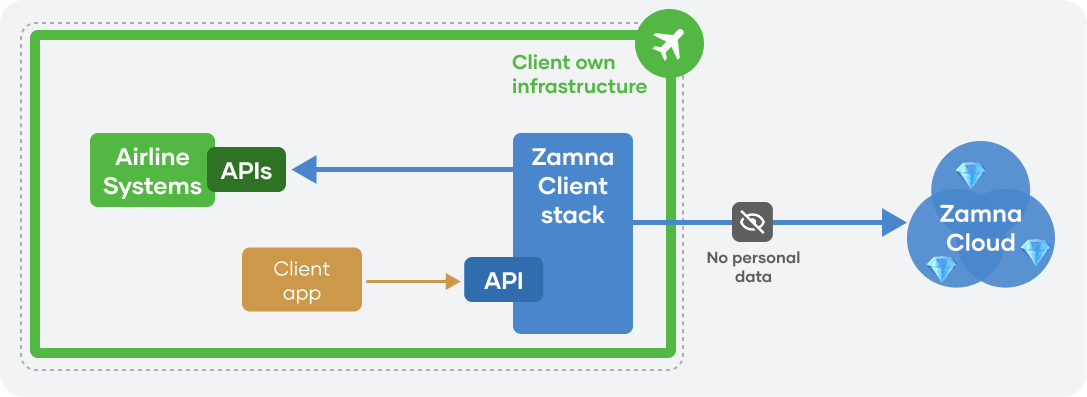
Zamna Client provides Ready To Fly API for Airline own applications/touch-points to interact with:
# 1.2. Zamna WebView
When the Zamna Webview (frontend application) is used, additional component is deployed, as well as public-facing API:
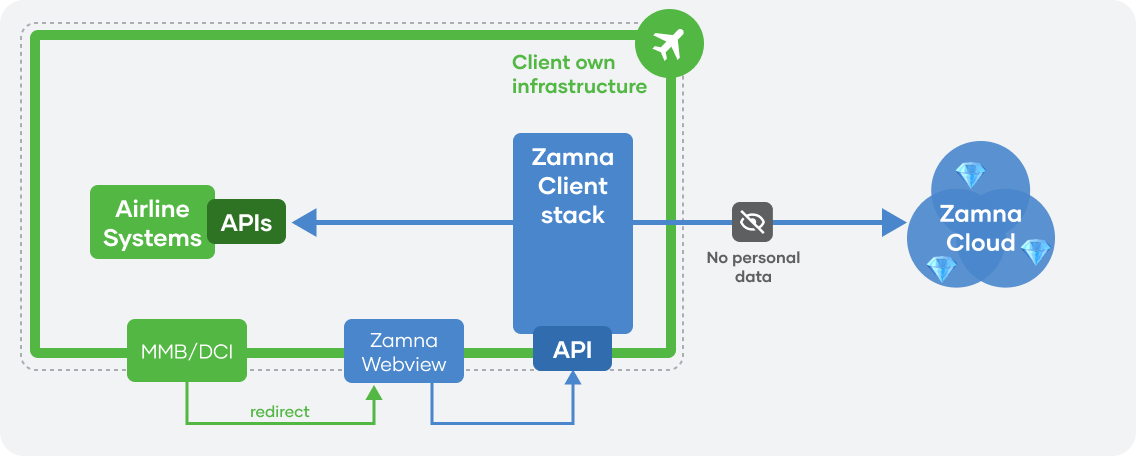
Zamna ApiServers can be integrated by Zamna with your DCS and other internal/external systems for orchestration, supporting complex workflows and rich use cases.
After the deployment of Zamna Client stack, simply navigate (web or mobile app) a passenger to /start2 endpoint (swagger (opens new window), redoc (opens new window)) with encrypted booking id as URL parameter — passenger will be authenticated and redirected to WebView via the browser (with a session JWT token). After passenger session is completed, WebView can return passenger back into client's business process with return_url parameter.
# 1.3. Authentication model
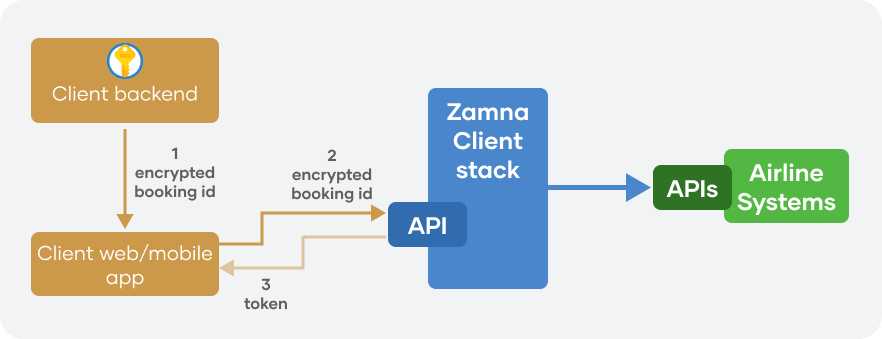
From a high-level point of view, basic authentication model relies on Airline apps having a key (AES/RSA, etc), by which they can encrypt booking identifier and pass it to mobile/web app, which in turn use it to invoke Zamna Client API and obtain session token to use with all other endpoints:
Alternatively, Airline app can retrieve new session token from Zamna Client and pass it to mobile/web app to directly interact with Zamna Client APIs:
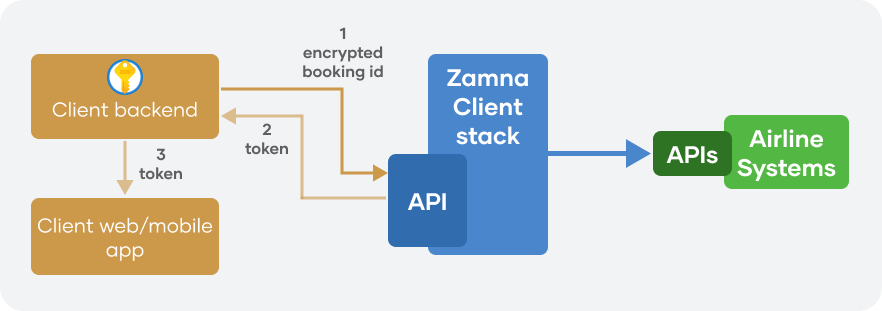
Zamna Client's authentication server (which is shiped as part of the Zamna Client stack) can be extended with other authentication approaches, adopted by Airlines.
# 1.4. API docs
Zamna Ready To Fly API utilises OpenAPI standard: Zamna Ready To Fly OpenAPI specification (opens new window), which can be used to auto generate native API clients across a variety of platforms (OpenAPI generator (opens new window)).
Swagger (opens new window) and redoc (opens new window) documentation is also available.
# 2. Flow
# 2.1. Overview
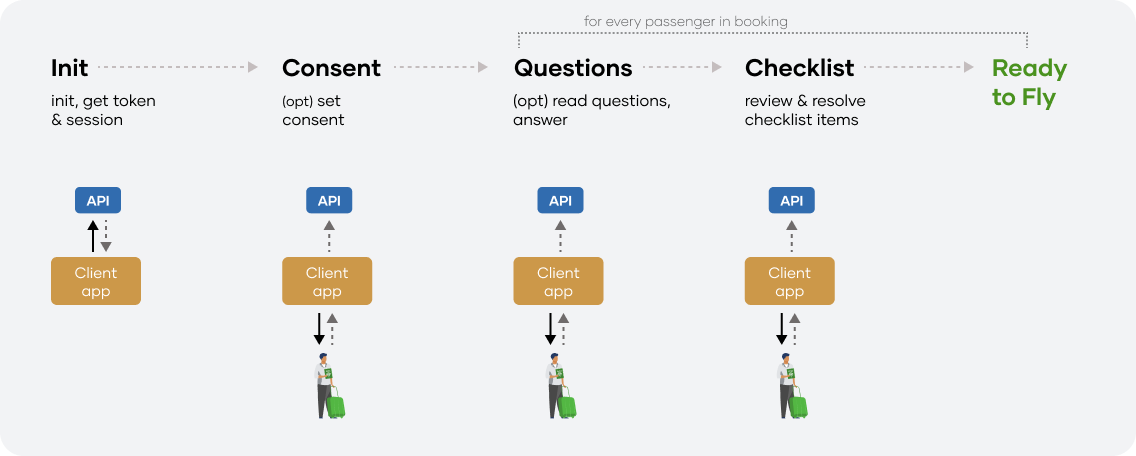
Localisations - for UI
Zamna Client API provides all necessary localisations for names, titles and descriptions for supported languages (Accept-Language header is supported by all relevant endpoints)
TIP
Every endpoint that changes session state returns its updated version on success
# 2.2. Init, get token & session
Call /start endpoint (swagger (opens new window), redoc (opens new window)) to retrieve Multipax session id and session token — both can be further passed to mobile/web app to interact with Zamna Client API directly.
Consent response (true/false) may also be set as part of the session initialisation.
At any point, current state of MultiPax session can be retrieved with /session/{session_id} endpoint (swagger (opens new window), redoc (opens new window)).
Current Pax session state can be queried from /session/{session_id}/pax-session/{pax_session_id} endpoint (swagger (opens new window), redoc (opens new window)).
# 2.3. MultiPax: booking container
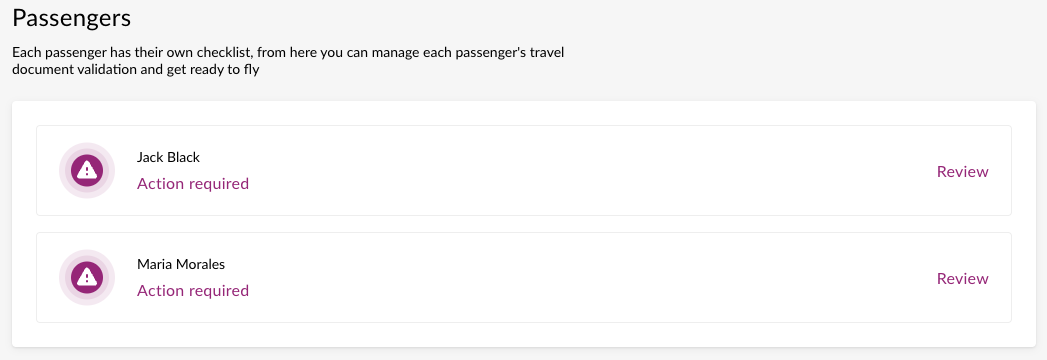
Multipax session may contain several Pax sessions (passengers). All actions (apart from consent) are performed at Pax session level.
In the UI, passenger may be provided with a choice:
# 2.4. MultiPax: set consent response
If consent was not set as part of the initialisation, PaxSession's required_action will be PROVIDE_CONSENT_RESPONSE.
No questions or checklist items will be present in PaxSession.
Consent should be taken from passenger in the UI and captured with /session/{session_id}/set-consent endpoint (swagger (opens new window), redoc (opens new window)). It will also return updated MultiPax session.
# 2.5. Pax: set nationality, birthdate - if required
If nationality or birthdate are required, PaxSession's required_action will be PROVIDE_NATIONALITY_OR_BIRTHDATE.
No questions or checklist items will be present in PaxSession.
Checklist nationality_required and birthdate_required properties indicate which data have to be collected from the passenger.
Nationality and/or birthdate are collected from the passenger in UI, eg:
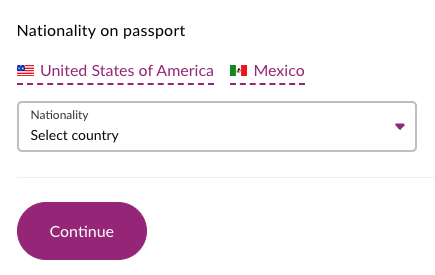
Collected nationality and/or birthdate may be set with /session/{session_id}/answers endpoint (swagger (opens new window), redoc (opens new window)). It will also return updated Pax session, which may include questions in Checklist.
# 2.6. Pax: read questions, provide answers
If any relevant questions are still remain unanswered, PaxSession's required_action will be ANSWER_QUESTIONS.
No checklist items will be present, as checklist has to be formed and requires certain answers from passenger.
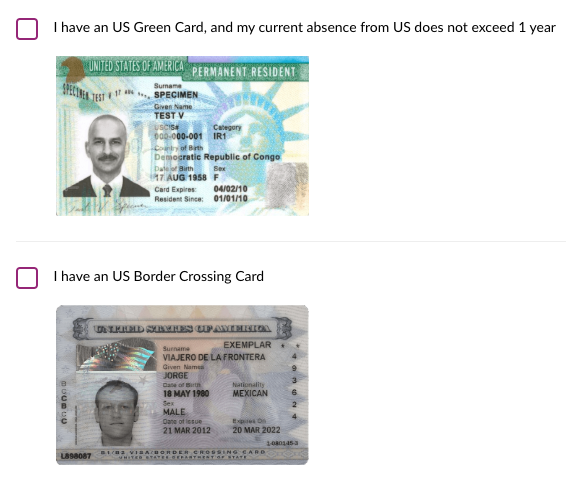
Questions can be read from Checklist and presented in UI, eg:
Localisations - for UI
All titles and descriptions are localised and returned by Zamna Client API (Accept-Language header is supported by all relevant endpoints)
Sample images for questions
For key questions, API returns sample image URLs (eg document samples, like in the screenshot above)
Boolean answers to questions can be provided with /session/{session_id}/answers endpoint (swagger (opens new window), redoc (opens new window)). It will also return updated Pax session, which may include items in Checklist (once formed).
# 2.7. Pax: review and resolve checklist items
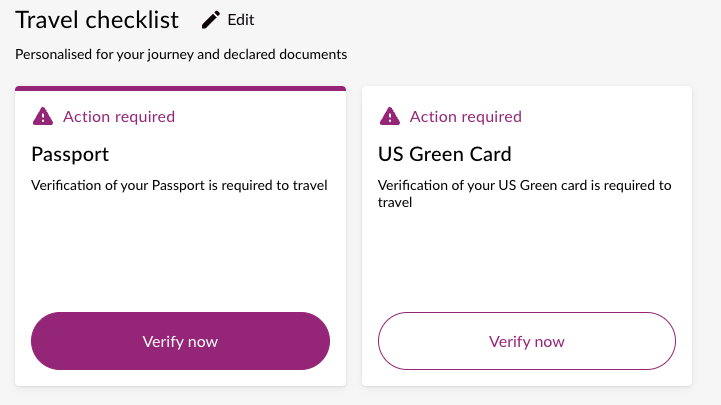
If consent response and nationality and/or birthdate were already provided, and all questions were answered, Checklist will contain a list of items — document requirements for passenger to satisfy in order to become Ready To Fly.
Checklist contains items and their current resolution status (eg NOT_YET_RESOLVED or RESOLVED). If not all checklist items are RESOLVED — PaxSession's required_action will be RESOLVE_ITEMS.
Checklist items can be presented to passenger in UI, eg:
Localisations - for UI
Zamna Client API provides all necessary localisations for names, titles and descriptions for all supported languages
For each checklist item, API provides supported resolution methods (MANUAL / SCAN / UPLOAD) which passenger may choose from, eg:
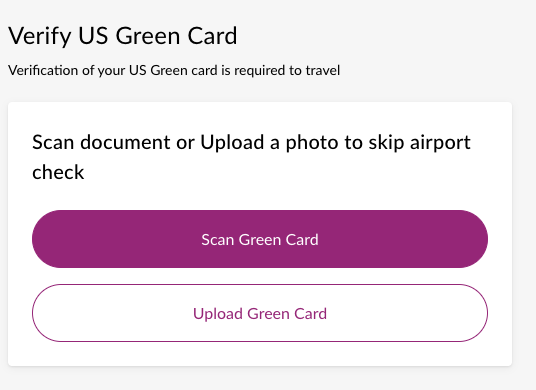
Once images are taken from the scanner, or passenger uploads files, base64-encoded file bytes should be sent to /session/{session_id}/pax-session/{pax_session_id}/apply-document/file endpoint (swagger (opens new window), redoc (opens new window)) for processing and validation.
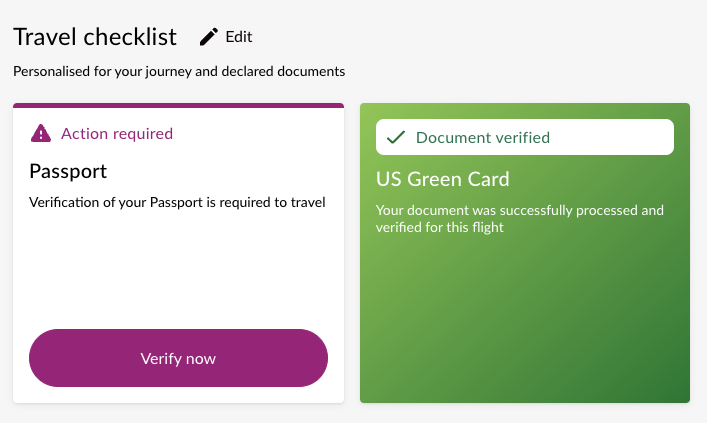
On success, updated Pax sesssion will be returned — containing checklist item as RESOLVED, eg:
DCS updates
In the background, Zamna Client adds required documents to the DCS and marks them as verified
Alternatively, an error will be returned with details on what went wrong:
- document processing error
- wrong document provided
- id mismatch to booking
- rules mismatch

Some checklist items can be resolved by completely different documents (eg Indian embassy visa as in-passport sticker vs. Indian E-Visa as PDF file), which will be highlighted by a force_document_type_required flag in allowed_documents_set record for this checklist item. In this case, passenger needs to select document type through UI, eg:
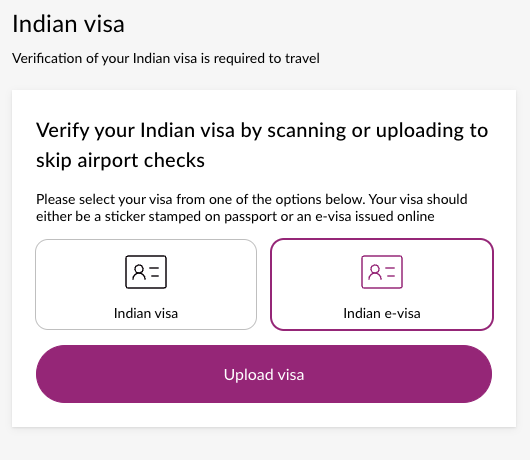
Selected document type has to be provided as force_document_type of the same /session/{session_id}/pax-session/{pax_session_id}/apply-document/file endpoint (swagger (opens new window), redoc (opens new window)).
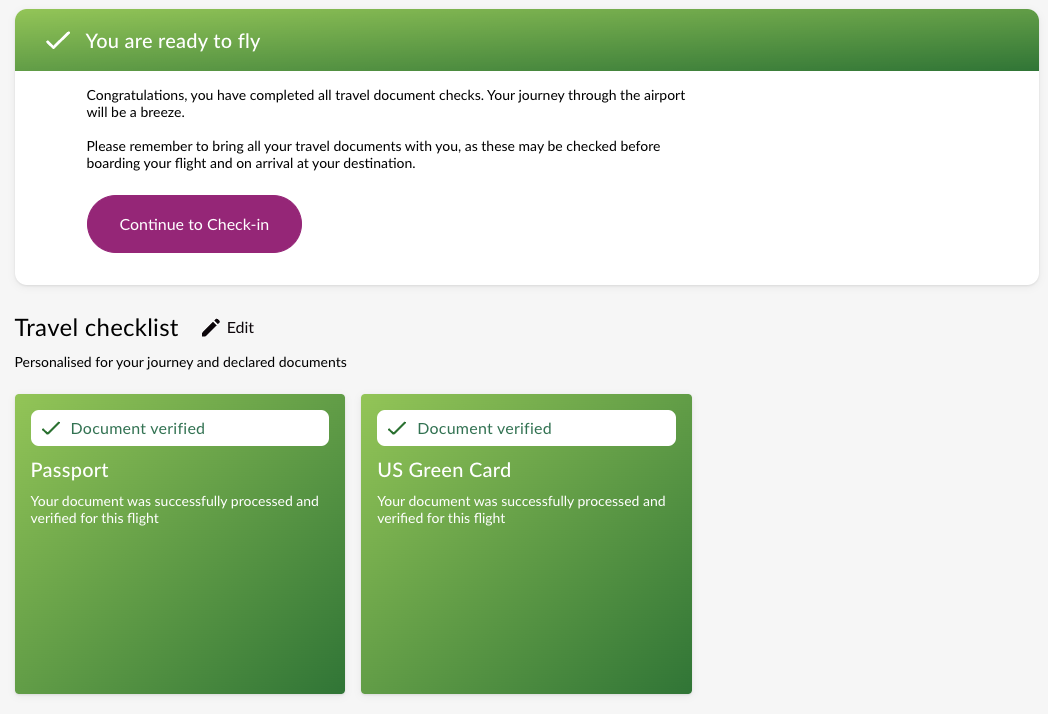
Once passenger resolves all the checklist items, Checklist's resolution_status will be READY_TO_FLY, and Pax session's required_action will be null (as no further action is required for this passenger):
DCS updates
In the background, Zamna Client sets/removes any required inhibitors, flags and/or SSRs
# 3. Main models and statuses
# 3.1. MultiPax session
Booking level
id- MultiPax session idjourney- journey details (departure, transit, arrival)paxs- collection of Pax sessions
# 3.2. Pax session
Passenger level
id- Pax session id, start withpax_pax- basic passenger details from booking (given names, surname, birthdate)checklist- Checklist (questions and items)required_action- next action for this passengerRequiredAction Description nullNo action required, present current Checklist status to passenger PROVIDE_CONSENT_RESPONSEConsent response is required PROVIDE_NATIONALITY_OR_BIRTHDATENationality and/or birthdate required. Look for checklist.nationality_requiredandchecklist.birthdate_requiredflagANSWER_QUESTIONSThere are not yet answered questions. Look for checklist.questionsRESOLVE_ITEMSThere are not yet resolved checklist items. Look for checklist.items
# 3.3. Checklist
id- checklist idstatus- checklist statusStatus Description ON_HOLDChecklist is currently on hold. Temporary status: usually, happens during rules updates FINALIZEDChecklist is finalised (usually 4 hours post departure), no more edits allowed ACTIVEChecklist is active, look for resolution_statusresolution_status- checklist resolution statusResolution status Description UNKNOWNTemporary status: usually, happens during rules updates ENTRY_NOT_ALLOWEDGiven provided answers, entry is not allowed for this passenger according to rules. Passenger may change answers to proceed NOT_ELIGIBLEPassenger is not eligible for online document verification according to airline business rules ACTION_REQUIREDChecklist requires actiones to be completed (either answer questions, or resolve items) READY_TO_FLYAll requirements were satisfied and verified, passenger is Ready to Fly DCS updates
In the background, Zamna Client sets/removes any required inhibitors, flags and/or SSRs
has_nationality_question-trueif nationality affects rules - require from passenger, unlessnationalityis not null (was provided already)has_birthdate_question-trueif birthdate affects rules - require from passenger, unlessbirthdateis not null (was provided already)questions- list of questions to present to passenger (this blocks presenting items, if not all questions are answered)items- list of checklist items
# 3.4. Question
type- discriminator for question type (yes-no-questionorhave-document-question)id- question id to sent answers withanswer- nullable answer (boolean)title- question title and subtitle (localised)Localisations - for UI
All titles and descriptions are localised and returned by Zamna Client API (
Accept-Languageheader is supported by all relevant endpoints)sample_image_url- optional sample image to go with the question (eg document example image)
# 3.5. Answer
question_id- question id to answer onvalue- answer to question (boolean)
# 3.6. Checklist item
id- checklist item idtype- checklist item type, String (egPASSPORT)title- title (localised)description- description (localised)Localisations - for UI
All titles and descriptions are localised and returned by Zamna Client API (
Accept-Languageheader is supported by all relevant endpoints)status- item statusStatus Description NOT_YET_RESOLVEDItem not resolved VERIFICATION_REQUIREDVerification (scan/upload) required to resolve item RESOLVEDItem resolved is_info- whether item isINFOand can't be resolved (egUSA ESTA)allowed_documents_set- set of documents which can be used to resolve this item (AllowedDocsSet)
# 3.7. AllowedDocsSet
allowed_documents- list of documents (AllowedDoc)force_document_type_required- iftrue, passenger have to pick document type fromallowed_documentsbefore resolving an item
# 3.8. AllowedDoc
type- document type, String (egUSA_GREEN_CARD)title- title (localised)description- description (localised)Localisations - for UI
All titles and descriptions are localised and returned by Zamna Client API (
Accept-Languageheader is supported by all relevant endpoints)provision_methods- ways to resolveProvision method Description MANUALDocument can be typed in manually (eg Travel doc) SCANDocument can be scanned UPLOADDocument can be uploaded sides_configuration- document configuration (what the document is)Sides configuration Description SINGLE_SIDE_OR_FILEEither document have one side (eg Passport), or 1 file (eg PDF E-Visa) MULTIPLE_SIDES_OR_FILESEither document have multiple sides (eg US Green Card), or multiple files (front plus back card photos) sides_expectation- what is expected (vs what the document is)Sides expectation Description SINGLE_SIDE_OR_FILEEither single side is expected (usually, MRZ side), or 1 file (eg PDF E-Visa) MULTIPLE_SIDES_OR_FILESEither multiple sides are expected (ie both sides of US Green Card), or multiple files
# 4. Stats/Analytics
# 4.1. Platform stats
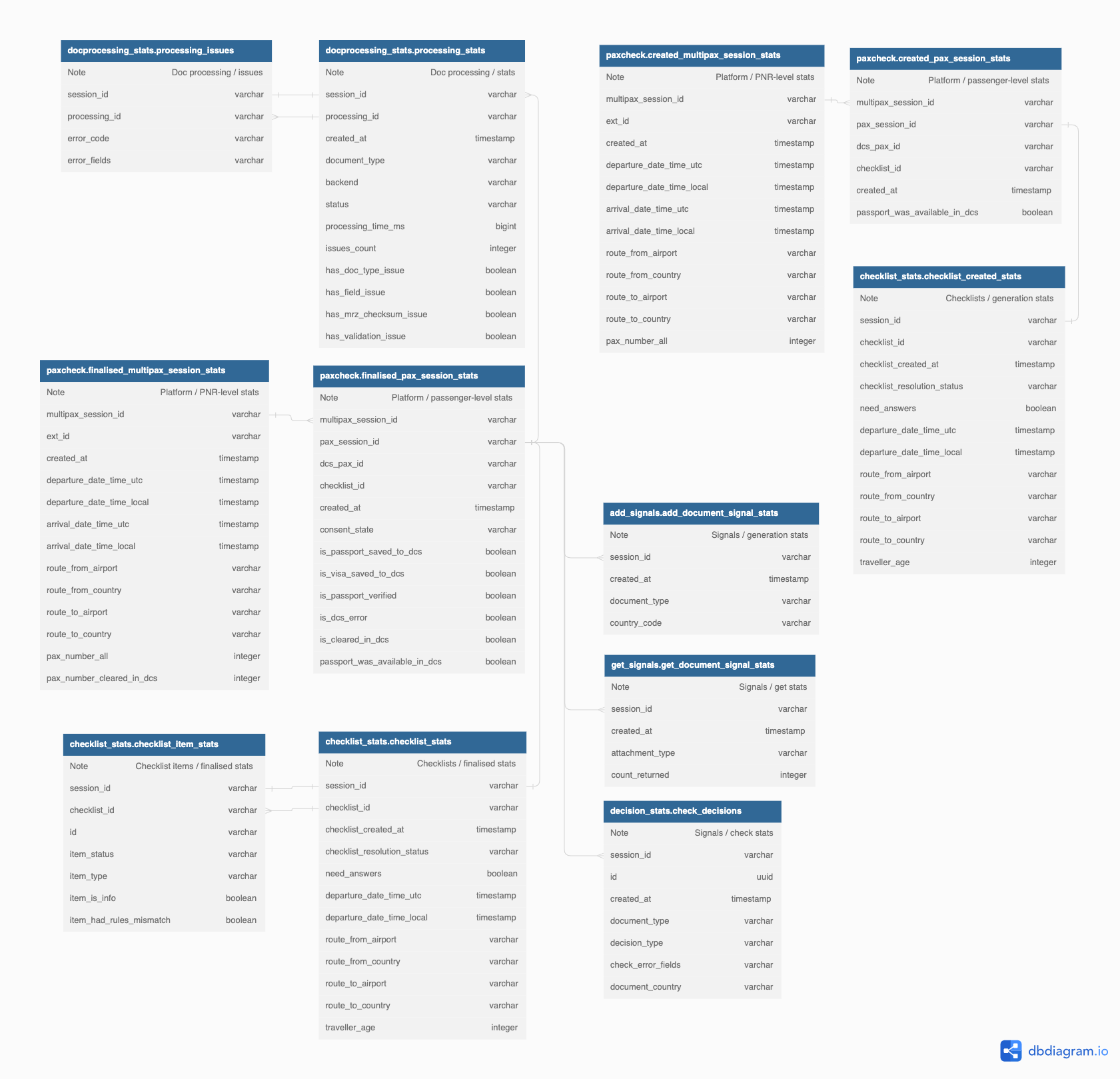
Zamna Client stack collects operational stats in the local PostgreSQL database, deployed with an Airline.
Each entry is marked with external identifiers (booking_id / session_id), thus stats database can be used as a data source for any modern BI tools and platforms.
Please refer to a detail reference
# 4.2. Webview analytics
Please refer to a detail reference